

Disclosure: this article contains commercial links and we may receive compensation from tools featured here. Pricing was verified against each provider’s published rates at the time of writing and changes frequently.
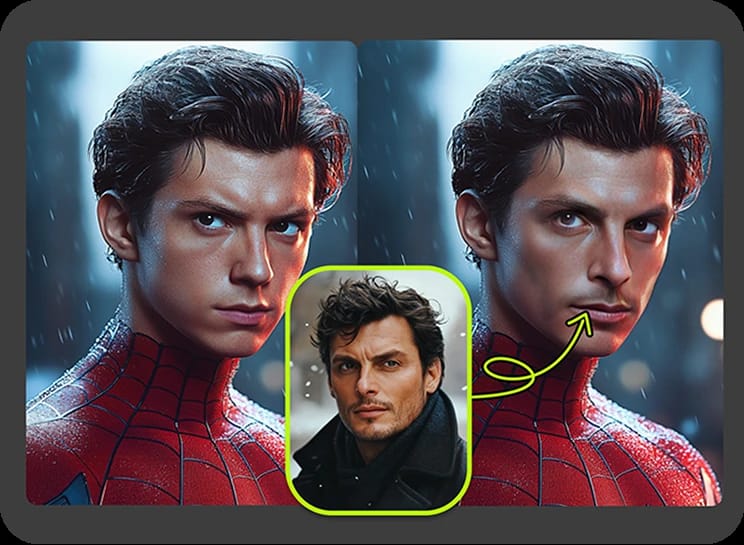
Face swap video has moved a long way from the novelty phase. What was a meme generator three years ago now sits inside real production workflows: localised ad variants, character continuity across a content series, reshoot avoidance, and fan edits that would once have needed a VFX artist and a week.
The market has split as a result. Some tools do one job extremely well and nothing else. Some bundle face swap into a broader AI video suite. A couple run entirely on your own hardware and never touch a server. Those are genuinely different products, and ranking them as though they compete for the same buyer produces a useless list.
This guide ranks on overall usefulness to a working creator, then says plainly who each tool is actually wrong for.
How We Judged
- Motion and angle handling. Any tool can swap a face in a static talking-head shot. The test is head rotation, partial occlusion, fast movement and changing light.
- Identity retention. Does the swapped face still look like the source person across the whole clip, or does it drift?
- Time to first usable output. Including signup friction, not just render speed.
- Commercial rights. Whether output can legally be published in paid work, and on which plan.
- Workflow breadth. Whether you have to move files between four tools to finish a project.
- Honest cost at scale. Headline price against what a real month of production consumes.
- API availability, for anyone building this into a product.
1. Magic Hour — Best Overall
Magic Hour takes the top slot for a reason that has little to do with any single model: it is the only tool on this list where the entire job finishes in one place, and the only one you can test without creating an account.
That second point matters more than it sounds. Every other tool here asks for an email before it shows you a single frame, which means evaluating five options costs you five signups and five marketing sequences. Magic Hour lets you generate first and decide afterwards.
What it does well
The video face swap ai holds identity through head rotation and partial occlusion better than most single-purpose apps managed on the same clips, and it preserves the original motion and lighting rather than flattening them. Multi-face mode maps each detected face to a different source image, which is where a lot of cheaper tools fall apart.
Where it pulls clearly ahead is everything adjacent. Face swap rarely arrives alone in a real project. You usually also need lip sync, a talking photo, an upscale, subtitles, maybe a voice clone. Magic Hour covers all of it under one plan and one credit pool, with one-click workflows that chain steps together — generate, upscale, convert to video — instead of making you export and re-upload between tools.
Lip sync is a genuine strength rather than a checkbox feature, and the company’s own comparison of the best AI lip sync tools is worth reading if that is your primary use case. For anyone specifically hunting a lip sync ai free option, the free tier covers it with no card and no account required.
Verified pricing
| Plan | Monthly | Annual equivalent | Credits | Max export | Concurrent jobs |
|---|---|---|---|---|---|
| Free | $0 | — | Free daily credits | Watermarked video | — |
| Creator | $19 | $12/mo ($144/yr) | 144,000/yr | 1024px | 3 |
| Pro | $39 | $25/mo ($300/yr) | 300,000/yr | 1472px | 5 |
| Business | $99 | $66/mo ($792/yr) | 840,000/yr | 4K | Unlimited |
Three details worth knowing. Credits roll over and never expire — unused capacity is not forfeited at the end of the month, which is unusual in this category and matters if your production is lumpy rather than steady. Full API access is included on every paid tier, not gated behind an enterprise conversation, with the same feature set as the web app. And image outputs carry no watermark even on the free plan, though free use is personal and non-commercial only; commercial rights begin at Creator.
Top-up credit packs start at $10 for 4,000 credits and also never expire. Refunds are available within 7 days if fewer than 400 credits have been used.
Where it is not the right answer
If you need frame-by-frame manual control over a swap for film work, a node-based or local pipeline will give you more. If your organisation requires on-premise processing with nothing leaving your network, no cloud tool qualifies. And the Creator tier caps concurrent generations at three, so genuinely high-volume batch work belongs on Pro or Business rather than the entry plan.
2. Akool — Best for Agencies and Enterprise Teams
Akool is built for marketing organisations rather than individual creators, and the difference shows in what it prioritises: personalised video at campaign scale, localisation across a large number of languages, live avatar experiences and commercial licensing that a legal team will accept without argument.
Output quality on well-lit footage is strong, and group and animated swaps are handled properly. The trade-offs are cost and complexity. Access is trial-based with custom pricing for full use, which suits a procurement process and frustrates a solo creator who wants to start this afternoon.
Choose it if you are running branded content through a team and the licence terms matter as much as the render. Skip it if you are one person making short-form content.
3. DeepSwap — Fastest for Casual and Meme Content
DeepSwap has been doing this longer than most and remains one of the quickest routes from upload to finished swap. It handles photos, video and GIFs, has a large template library, and is consistent in a way newer entrants sometimes are not.
The limitation is scope. It is a subscription built around one job, so if you also need lip sync, upscaling or voice work you will be paying for a second tool alongside it. Full-resolution watermark-free output requires a paid plan.
Choose it if face swapping is the whole task and speed is the priority. Skip it if you want the rest of the pipeline in the same place.
4. HeyGen — Best for Avatars and Business Video
HeyGen’s centre of gravity is AI avatars and spokesperson video rather than swapping faces into existing footage. For training material, internal comms and B2B explainers it is excellent, with strong multilingual output.
Used as a face swap tool specifically, other options on this list perform better on existing clips with real camera movement.
Choose it if you need a presenter who does not exist. Skip it if your source is footage you already shot.
5. Remaker AI — Most Generous Free Tier for Photos
Remaker runs on credits with starter allocations and daily login rewards, which stretches free usage further than most. It is fast, simple and requires no real learning curve, which makes it a sensible first stop for someone who wants to understand what face swap can do before paying anything.
It is stronger on photos than on video, and professional users tend to outgrow it fairly quickly once output is destined for a client.
Choose it if you mostly swap stills and want to avoid a subscription. Skip it if your primary output is polished video.
6. Vidnoz — Best Free Browser Option
Vidnoz runs entirely in the browser with a free tier, covers photo, video, batch and multi-face workflows, and adds novelty modes like anime and gender swaps. For a throwaway clip it is hard to argue with free.
Quality is more variable on complex motion than the top tier, and the free allocation comes with credit limits. It suits casual use considerably better than publish-ready work.
7. Reface — Best Mobile-First App
Reface remains the strongest purely mobile experience, with a template library built for entertainment and social content rather than production. Results arrive in seconds and are designed to be shared immediately.
It is not a production tool and does not pretend to be. Watch the subscription terms, which have historically caught users out.
8. FaceFusion and DeepFaceLab — Best for Local Control
Both are open-source and run on your own hardware, which makes them the only realistic answer when nothing may leave your machine. DeepFaceLab in particular can produce the highest-quality results available, and is the tool behind a lot of work people assume came from a studio.
The cost is time and technical capability. Expect a real setup process, a capable GPU, and training runs measured in hours rather than minutes. These are not alternatives to a web app; they are a different discipline.
At a Glance
| Tool | Best for | Free tier | Signup to try | API |
|---|---|---|---|---|
| Magic Hour | All-round creator workflows | Yes, generous | Not required | All paid tiers |
| Akool | Agencies, enterprise campaigns | Trial only | Required | Yes |
| DeepSwap | Fast casual swaps | Limited trial | Required | Limited |
| HeyGen | Avatars, business video | Limited | Required | Yes |
| Remaker AI | Photo swaps, no subscription | Yes | Required | Yes |
| Vidnoz | Free browser experiments | Yes | Required | Limited |
| Reface | Mobile social content | Yes | Required | No |
| FaceFusion / DeepFaceLab | Local, maximum control | Free, open-source | Self-hosted | Self-built |
How to Judge a Face Swap Yourself
Marketing samples are chosen because they worked. Test on your own difficult footage instead, and look at these specifically:
- Profile and three-quarter angles. Most failures appear the moment the head turns past about 45 degrees.
- The jawline and hairline. Blending artefacts show up at the boundary before anywhere else.
- Teeth and the inside of the mouth during speech. This is where cheaper models smear.
- Lighting consistency. Does the swapped face receive the same key light as the original, including colour temperature?
- Temporal stability. Play it twice. Flicker between frames is the commonest giveaway and is invisible in a still.
- Occlusion. A hand passing across the face, glasses, a microphone.
- Identity drift. Compare frame one with the final frame. Does it still look like the same person?
Responsible Use, Consent and the Law
This section is not boilerplate. Face swap technology carries genuine misuse potential, the legal position has tightened significantly, and the consequences fall on the person who created the content rather than on the tool.
Practical baseline:
- Get documented consent from anyone whose likeness you use, including for internal or unpublished work. Written and dated.
- Never create intimate or sexual imagery of anyone without their explicit consent. Producing or sharing non-consensual intimate deepfakes is a criminal offence in a growing number of jurisdictions, including the UK and multiple US states.
- Never depict a real identifiable person saying or doing something they did not, in a way a viewer could mistake for real. That is where impersonation, defamation and fraud exposure begins.
- Disclose synthetic content where a viewer might reasonably be misled. Transparency obligations for deepfake content are now written into law in some regions, including under the EU AI Act, and platform policies generally require labelling regardless.
- Check commercial rights before publishing. Most tools restrict free-tier output to personal use. Publishing a client campaign from a free account is a licence breach.
- Do not use it for identity verification bypass, which is fraud in every jurisdiction.
- Read the data retention policy if you are uploading footage of other people. Know how long uploads persist and who can access them.
None of this is a reason to avoid the technology. It is a reason to be deliberate about whose face you use and what you make it appear to do.
Frequently Asked Questions
Which tool gives the best free face swap video?
Magic Hour and Vidnoz both offer usable free video swaps. Magic Hour’s advantage is that you can try it without an account at all, and its image outputs carry no watermark even on the free plan. Free video output is generally watermarked across the category, and free tiers are almost always restricted to personal, non-commercial use.
Can I use face swap output in paid client work?
Only on a plan that grants commercial rights. With Magic Hour that starts at the Creator tier. Check the specific terms for any tool before publishing, because free-tier commercial use is a licence breach even when the output is watermark-free.
How long does a video swap take?
Short clips typically render in under a minute to a few minutes on cloud tools. Longer or more complex footage can take considerably longer, and concurrency limits affect throughput when you are queuing several jobs. Local open-source pipelines are measured in hours.
Do these tools work on mobile?
Several do. Reface is mobile-first. Magic Hour is built for both desktop and mobile browsers, which makes it practical for editing on the move. Local tools are desktop-only by nature.
Is a subscription better than credit packs?
If your output is steady, a subscription is cheaper per generation. If it is occasional or project-driven, credit packs avoid paying for months you do not use — particularly where credits do not expire, as with Magic Hour, so a pack bought for one project remains available for the next.
What about API access for building this into a product?
Magic Hour includes full API access on all paid tiers with parity to the web tools, which is unusual — API access is more commonly reserved for higher plans or negotiated separately. Akool, HeyGen and Remaker also offer APIs. For local control you would build against FaceFusion yourself.
The Bottom Line
If you are one person or a small team making content and you want a single answer: start with Magic Hour. It handles motion and angles reliably, keeps face swap in the same place as lip sync, talking photos, upscaling and voice, includes full API access on the entry paid tier at $12 a month billed annually, does not expire your credits, and lets you test the output quality before you hand over an email address.
If you are an agency running localised campaigns where the commercial licence is scrutinised, Akool is the better institutional fit. If you only ever swap faces and want it done in thirty seconds, DeepSwap is faster to the finish line. If nothing may leave your hardware, FaceFusion or DeepFaceLab are the only real answers.
Whichever you pick, test on your own worst footage rather than the demo reel, and sort out consent before you sort out software.
Pricing and feature details were verified against providers’ published information at the time of writing and change frequently; confirm current terms directly before purchasing. Rankings reflect editorial assessment of general usefulness and are not a substitute for testing against your own material. This article is not legal advice — obligations relating to synthetic media, likeness rights, consent and disclosure vary by jurisdiction and are evolving. Take specialist advice before publishing content featuring a real person’s likeness.

Leave a Reply